Deconvolve
A plugin for Alakazam
Tools > 3. Epoching and Averaging > Deconvolve · continuous → averaged, epoched, or averaged terms · Deconvolve
The alternative to epoching and averaging where responses overlap. Averaging assumes that each epoch holds the response to its own event and nothing else. When events follow each other faster than a response decays, in reading, free viewing, fast presentation or with a response after every stimulus, the same samples carry the end of one response and the start of the next, and each bin’s average carries a smear of its neighbours’. Deconvolve fits all bins at once against the whole continuous recording, as a linear regression on a time-expanded design matrix, so that a sample explained by two events is shared between them (Smith and Kutas 2015; Ehinger and Dimigen 2019; Dimigen and Ehinger 2021). The fitting is done by the Unfold toolbox (Ehinger and Dimigen 2019). Section 7 works through a complete example on published data.
| Option | Default | Meaning |
|---|---|---|
| Define bins | the dataset’s own bin tags | The bins, in DefineBins’ language and editor. An epoch line is ignored: the fit uses the continuous recording, and Window sets the response window. |
| Window start, stop | -200, 800 ms | The response window fitted around every event. |
| Baseline start, stop, Baseline-correct the result | off; the pre-event window offered | Off, the waveforms are the betas as fitted, as Unfold returns them. On, they are baseline-corrected over the window, taken as Unfold’s uf_plotParam takes a baseline: from its start up to, but not including, its stop. |
| Result | One waveform per bin | One waveform per bin (shaped like Average), overlap-corrected trials (shaped like DefineBins’ epochs), or the model’s terms. |
| Terms evaluated at | ten quantiles | For the terms: where continuous and spline terms are evaluated, as sac_amplitude = 0.5 1 2; rt = 300 500. A term not named is evaluated at ten quantiles of its own values, the toolbox’s default. |
| A term not named, at | ten quantiles of its values | For the terms: where a continuous or spline term not named in Terms evaluated at is evaluated: ten quantiles of its values (the toolbox’s default), ten values evenly spaced from its minimum to its maximum, or its mean alone (Unfold’s uf_predictContinuous). |
| Other terms added at | their mean value (MEM) | For the terms: how each term’s waveform carries the model’s other terms, at their mean value (MEM, the toolbox’s default) or as their average marginal effect (AME). |
| Formula per bin | y ~ 1 |
What explains the bin’s response, in Unfold’s notation (below). |
| Factors coded as | reference | How a factor (cat() in a formula) is coded, by Unfold’s uf_designmat: reference coding, where the intercept is the first level (the toolbox’s default), or effects coding, where it is the mean over the levels and each continuous term is centred on its events’ mean. A bin’s waveform is the same either way; the model’s terms differ. Effects coding with an interaction of a factor and a continuous term is refused (the waveform cannot hold that term at its pooled value). |
| Events in no bin, modelled and dropped | all | Event codes outside the bins to model as nuisance, so that their overlap is removed too. |
| Artefact threshold, Measured in a window of, Stepped by | 150 µV, 2000 ms, 100 ms | Stretches whose peak-to-peak amplitude in the moving window exceeds the threshold are left out of the model; 0 turns this off. |
| Artefact scan on | every channel | The channels the scan looks at: every channel, as the toolbox scans, or the scalp EEG only. |
| Missing values | filled in with the median | An event without a number its formula uses: filled in with the median, the mean or a random one of its bin’s other values, or the event left out of the model, by Unfold’s uf_imputeMissing; or refused. |
| Around cuts | fitted as they are | What happens either side of a cut in the recording (a boundary event): fitted as it is, across the join, as the toolbox does; or the longer side of the response window left out on each side, so that no event’s window is fitted across two moments that were never adjacent. A trial whose window spans a cut is left out either way. |
| Overlap correction | on | On: the bins fitted against the continuous recording (deconvolution). Off: the same formulas fitted to epochs, without the neighbours’ overlap taken out (below). |
| Time basis | one beta per sample | How each response is spread over the window, by Unfold’s uf_timeexpandDesignmat: one beta per sample (the toolbox’s default), or a number of cubic splines or Fourier frequencies (30 unless changed), which share their betas between neighbouring samples and give smoother waveforms from fewer parameters. With overlap correction, and not for the trials (below). |
| Solver | the toolbox’s default | lsmr (on epochs, pinv); MATLAB’s exact solver; or glmnet’s regularised fit (below). |
| Solver iterations | 400 | The most iterations lsmr takes per channel, the toolbox’s own limit. A fit that reaches it says so. |
| glmnet alpha | 1 | For glmnet: 1 is lasso, 0 ridge, between them elastic net. |
| Collinearity (VIF) | not checked | The variance inflation factor of every column of the time-expanded design, by Unfold’s uf_vif: how hard the overlap makes it to tell the bins apart (with overlap correction only; long windows need much memory). Each term’s largest is in the notes; the toolbox notes that splines give high values that are usually no problem. |
| Model fit | not measured | How much of the recording the model explains, per channel, by Unfold’s uf_checkmodelfit (with overlap correction only): R², the partial R² of each term (the model refitted without it), or either cross-validated (each fold fitted on the rest). The summary is in the notes and the data-quality report. |
| Folds cut at | none | For a cross-validated fit: the event code the recording is cut into folds at, such as the breaks between blocks. The toolbox refuses a code that falls where an event’s response is modelled. |
| Trials made by | Alakazam | For overlap-corrected trials: Alakazam’s own arithmetic, or the toolbox’s uf_erpimage, channel by channel, the same trials far later on a long recording (below). |
Formulas
Each bin has a formula in Unfold’s Wilkinson notation. The dialog lists the event fields a formula can use, by kind, with their counts, and shows the columns the toolbox builds for each formula before anything is fitted.
| Formula | Meaning |
|---|---|
y ~ 1 |
the bin’s own waveform, nothing else |
y ~ 1 + rt |
plus a waveform that scales linearly with rt |
y ~ 1 + spl(rt, 5) |
plus a smooth, non-linear effect of rt, with 5 spline functions |
y ~ 1 + circspl(angle, 5, 0, 360) |
a circular spline, for an angle |
y ~ 1 + cat(side) |
a factor, coded against its first level |
y ~ 1 + cat(side) * rt |
a factor, a linear term and their interaction |
y ~ 1 + 2dspl(x, y, 5) |
a smooth surface over two fields, such as a fixation’s position |
A term is a control. Every bin’s waveform is the model’s prediction with each continuous and spline term held at the same value for every bin (for a spline, over the range the bins share), and each factor at the bin’s own mix. An interaction with a continuous term is held at the same value too. So a reaction time or saccade size that differs between bins does not appear as a difference between them, which is the point of including it (Dimigen and Ehinger 2021).
Bins may share events, as they may for Average: an event counts in every bin it belongs to. A bin nested in another (“Rare” inside “All stimuli”) is then the response of its own events, and the outer bin the average over all of its events. Internally each set of bins that some events share is fitted as one event type, with the terms of all those bins’ formulas, and the model list says which bins share events.
An event without a number its formula uses is handled as Missing values says, by Unfold’s own uf_imputeMissing, between building the design and fitting it, as the toolbox’s workflow places it. The median, the mean or a random draw is taken from the bin’s other events, and the filled-in value is fitted; a waveform per bin is still held at the values the events have. Leaving the events out (drop) leaves them out of the overlap correction too: their responses stay in the recording, unmodelled, and the bins count, average and cut trials without them. The model list says how many events lack which field. A factor needs a level on every event of the bin, whatever is chosen: the toolbox cannot build a factor with an event that has none, and uf_imputeMissing fills in numbers.
What to model
Overlap is removed only where it is modelled. A response to an event outside the bins still overlaps the bins’ responses unless that event is modelled as nuisance, which is why Events in no bin defaults to all of them. There is one exception, and the dialog’s list is where to decide it: an event that follows another at a nearly constant lag (a fixation 12 ms after its saccade, or a trial-start marker a fixed time before each stimulus) cannot be told apart from it, and modelling both makes the regression ill-conditioned, so that the solver may fail to converge. Model one of the pair.
The dialog finds such pairs for you. When an event in no bin that is ticked keeps a nearly constant lag to a bin or to another ticked event, for most events of both, with a spread under 20 ms and close enough for their responses to overlap, the model lists a warning that names the two and the lag, and an alert says so whenever the choice creates one. Unticking the event clears it; its response then stays in the bin’s waveform, as it would in an average. The warning does not stop OK, and the fit notes it too, naming the pair as the likely cause if the solver then does not converge.
Artefacts are handled by leaving stretches out of the model rather than by dropping epochs, so an event next to a bad stretch keeps the rest of its data. The defaults are the toolbox’s, every channel scanned. An eye channel’s range is several times the EEG’s, so where the eye channels are in the recording, scanning the scalp EEG only leaves out far less of it; the eye channels are still fitted. In reading and free viewing, where the eye movements are the task, it is usually better to set the threshold to 0 and model the saccades and blinks instead.
The three results
- One waveform per bin has Average’s shape, so ERP Measure, scalp maps, grand averages and the reports read it unchanged. A fitted waveform has no trial-to-trial standard error of its own.
- Overlap-corrected trials are one epoch per binned event, shaped like DefineBins’ epochs, each the recording around its event with every other event’s fitted response subtracted: the trials Unfold’s own
uf_erpimagemakes, its modelled responses plus residuals, computed by Alakazam at the trials’ own samples unless Trials made by asks for the toolbox’s call (see Long recordings, below). Averaging them returns the fitted waveforms; what they add is the trials themselves, for an ERP image without the overlap (The plot area) and for the data-quality report’s measures of trial-to-trial noise. A trial whose window touches a stretch left out of the model had nothing subtracted there and is dropped, and counted. The toolbox cannot make them for a glmnet fit (below). - The model’s terms: every factor level, and every continuous or spline term at chosen values, each as a whole waveform with the model’s other terms added in (Unfold’s
uf_predictContinuousanduf_addmarginal). Other terms added at decides how: at their mean value (MEM, the toolbox’s default), or as their average marginal effect (AME), a spline averaged over its events’ own values, as One waveform per bin has it. The two differ only for a spline, and most for a circular one: the mean of angles near 0 and 360 degrees is a direction no event had. A 2D spline is named by both fields in Terms evaluated at (x = 1 2; y = 0.5).
With overlap correction, Deconvolve needs continuous data without a DC offset, since the regression has no intercept for the recording as a whole: high-pass filter first.
Long recordings
On a long recording with many events, two steps take most of the time. The busy indicator shows how far the trials have got, and the fit when it runs on parallel workers (one after another, the toolbox fits every channel in a single call, which reports no progress).
- The fit solves one channel after another. With the default solver (lsmr) and a large job, the channels are fitted on parallel workers, each running the toolbox’s own
uf_glmfiton its channel. The result is the same to rounding error (a worker computes on one thread and sums some terms in another order), and a channel that ran out of iterations still says so. - The overlap-corrected trials: by default (Trials made by: Alakazam) they are computed only at the trials’ own samples and for every channel at once: the recording less the model’s prediction there, plus the event’s own fitted response, with the events kept and the windows cut as
uf_epochand EEGLAB’spop_epochkeep and cut them. It agrees with the toolbox’s trials to rounding error, with cuts, stretches left out, covariates and splines, but it is Alakazam’s arithmetic rather than the toolbox’s call. Trials made by: the toolbox callsuf_erpimagefor each channel instead, which epochs the whole recording around every modelled event, three times, and on a long recording with many events adds up to a long wait; on a large job the channels go to parallel workers. Settings and templates stored before the choice existed make their trials Alakazam’s way.
Parallel workers are used only when the job is large enough to repay starting them (which takes a while the first time), when the Parallel Computing Toolbox is installed, and when Process recordings in parallel is checked in Alakazam’s Settings (Processing). How many: as many as the cores and the free memory allow. A pool already running is used as it is. Under Apply to All Raw Files, where each recording already has a worker of its own, Deconvolve does its channels one after another on that worker.
Without overlap correction, and the solvers
Overlap correction off fits the same bins and formulas the toolbox’s other way, a regression on epochs (Unfold’s uf_epoch and uf_glmfit_nodc): each event’s window on its own, the neighbours’ overlap left in. With y ~ 1 a bin is then the mean of its epochs, as Average gives it, except that the toolbox rounds each event to the nearest sample where DefineBins takes the sample at or before it. With a formula it is the regression without deconvolution, which is what Unfold compares a deconvolution with. An epoch that touches a stretch the artefact scan marks, spans a cut or runs off the recording is left out, and counted; the trials are the epochs as they were cut. A DC offset is no obstacle here, since every sample of an epoch has its own intercept.
Solver chooses how the fit is solved. The toolbox’s default is lsmr, an iterative solver (pinv on epochs). The exact solver, MATLAB’s own, needs no iteration limit but, as the toolbox warns, can need tens of gigabytes of memory for a long recording. glmnet fits a regularised model, its strength chosen by cross-validation: its betas are shrunk towards zero, and lasso (glmnet alpha 1) sets some to exactly zero, so the waveforms are no longer the least-squares ones. With overlap correction a glmnet fit gives no overlap-corrected trials (below), so that combination is refused. The toolbox’s other two methods are not offered, since its own help advises against them.
Settings stored before these choices existed. A template saved before Artefact scan on, Other terms added at and Missing values were settings (with V0.4.5 or earlier) was run with the scalp EEG only, AME and missing numbers refused, and replays and reopens with them, so it gives the result it always gave. One saved before Around cuts was a setting (with V0.4.5.2 or earlier) left a window out around every cut, and still does. Without Overlap correction or Solver it is a deconvolution by lsmr, as it always was.
How the Unfold toolbox is called
The technical note Deconvolve and the Unfold workflow goes through the toolbox’s own account of its workflow step by step: which function Deconvolve calls, with which settings, what it adds before and after, and every place it departs from a toolbox default.
Deconvolve calls the Unfold toolbox as an Unfold script does, with the same inputs, starts from its defaults, and keeps its results as they are, so a result is the one Unfold itself gives. The artefact scan, for example, is handed the dataset’s own events, cuts included, and looks at each stretch between cuts on its own. Eight details of the toolbox are worth knowing (Unfold 1.3.1, unchanged in its current version):
- Joining marked stretches.
uf_combineWinrejjoins overlapping marked stretches by ending the joined one where the later-starting one ends. Where one stretch lies wholly inside another, the joined stretch ends with the inner one, and the rest of the outer one is fitted. It arises only where two sets of marks are joined and one lies inside the other. In Deconvolve those are the scan’s marks and, with Around cuts set to leave a window out, the zones around cuts, and it needs an artefact window shorter than the longer side of the response window, which the defaults are not. - One-letter factor levels.
uf_designmatgives an empty event field the value NaN, so that a numeric field stays numeric, and MATLAB’sstruct2tablethen reads levels that are all single letters, together with NaN, as characters rather than text. The design cannot then be built. It needs levels that are all single letters and an event without the field; name the levels with two letters or more (Troubleshooting). - The scan’s edges. ERPLAB’s moving window, which the toolbox uses, starts one sample in and stops when the next step would run off the end, so the first sample and less than one step at the end of each stretch are not looked at.
- Zeros in a covariate. The mean and quantiles of a continuous term leave out values that are exactly zero, as the toolbox’s own message says, since zero is what the rows of the other event types hold. A covariate whose own values include zero (a rating of 0) is summarised without them; name the values in Terms evaluated at where that matters.
- Filling in missing values.
uf_imputeMissingfills in a spline’s columns one by one, so a filled-in event’s row is not the spline at any one value; its warning that more than 5% of a predictor is missing counts against every event in the model, not the bin’s own; and its random draw (marginal) stops when two predictors miss different numbers of values, since it reuses one list of drawn values from predictor to predictor. Deconvolve then says so; choose the median, the mean or drop instead. - Trials at the nearest sample.
uf_erpimagecuts its trials withuf_epoch, which rounds each event to the nearest sample. Where events fall on the same sample it keeps one trial for them, which holds the fitted response of the one earlier in the recording’s event list but is labelled by the one it finds first by type. Its output does not say which is which, so an event that shares its sample with another has no trial; Deconvolve counts them and says so in its notes. - No trials from a time basis.
uf_erpimagemultiplies the design, whose columns are splines or frequencies with such a basis, by betas already turned back into samples, and the two do not match. Deconvolve refuses a time basis with overlap-corrected trials before fitting, and says why. - No trials from glmnet.
uf_erpimageasks for a beta of every column of the design, and glmnet adds a column of its own, an intercept for the whole recording, whose betauf_condensedoes not return. Deconvolve refuses glmnet with overlap-corrected trials before fitting, and says why; choose another solver for the trials, or ask glmnet for the waveforms or terms.
Troubleshooting
Deconvolve warns that the solver did not converge. The design is close to collinear: often two event types at a nearly constant lag are both modelled (a fixation and the saccade just before it, a trial marker and the stimulus a fixed time later), or a formula has more terms than its events support. Model one of each such pair (What to model). The Deconvolve dialog warns about such pairs before the fit, and the warning after it names them. Where the design is sound and the fit is merely slow to settle, raise Solver iterations (400 by default, the toolbox’s own limit).
Deconvolve says Unfold cannot build the design: “expected to be a cell array, was char”. The Unfold toolbox (1.3.1) cannot build a factor whose levels are all single letters (L, R) once another event type in the model lacks that field: MATLAB’s struct2table then reads the levels as characters rather than as text. Give the levels longer names (left, right); the message names the factor.
Deconvolve says the toolbox could not draw the missing values. With Missing values set to a random draw (marginal), the Unfold toolbox (1.3.1) stops when two predictors miss different numbers of values: it reuses one list of drawn values from predictor to predictor. Choose the median, the mean or leaving the events out instead; the message names the fields and how many values each lacks.
Deconvolve refuses a factor some events have no level of. The Unfold toolbox cannot build a factor with an event that has no level of it, and Missing values fills in numbers, not levels. Give those events a level, or leave the factor out of that bin’s formula.
Overlap correction by deconvolution
When events follow each other faster than a brain response decays, the average of one event’s epochs contains parts of the responses to its neighbours. For saccades during visual search, Dandekar et al. (2012) showed that averages are systematically distorted by this overlap, and recovered the responses with a general linear model instead. Deconvolve (described above) separates them with such a regression, fitting every event’s response at once on the continuous recording (Smith and Kutas 2015; Ehinger and Dimigen 2019; Dimigen and Ehinger 2021). This chapter works through a complete analysis on published data: Figure 11 of the Unfold toolbox paper (Ehinger and Dimigen 2019), rebuilt from the authors’ own recording with a template that comes with this plugin (FaceSaccadesDeconvolution.alztemplate, in the templates folder of the installed plugin, which Show folder in Install plugins leads to). How Deconvolve calls the toolbox, step by step against the toolbox’s own workflow, is in the technical note Deconvolve and the Unfold workflow.
The data
One participant of a face-discrimination task recorded by the authors. A face was shown for 1350 ms and the participant pressed a button to judge its emotion; although told to keep fixating, they made small involuntary saccades towards the mouth of the face. Every trial therefore holds three overlapping responses: to the face (stimonset), to each saccade (saccade, the first a median 250 ms after the face) and to the button press (buttonpress, a median 750 ms after the face). The recording, 40 channels at 500 Hz including the eye electrodes IO1, IO2, LO1 and LO2, and the authors’ own script are on the paper’s OSF page (osf.io/wbz7x); they are not part of the repository. The authors’ script calls the figure “Figure 10”, its number in the preprint.
The template
Select the recording, right-click and Apply Template, choosing the template. It adds two nodes:
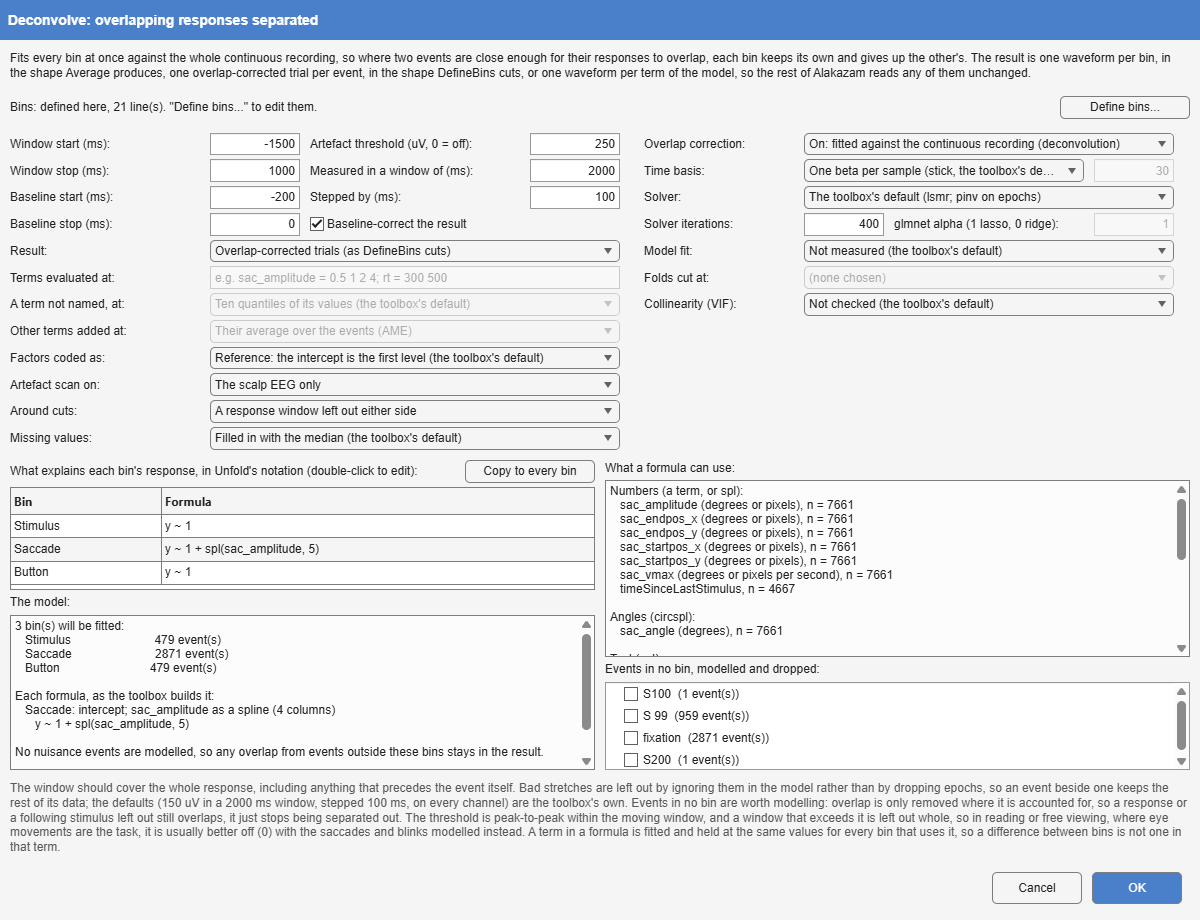
- Deconvolve, returning overlap-corrected trials (Result: Overlap-corrected trials), with the paper’s model:
- three bins, one per event type (
bin 1 "Stimulus" "stimonset",bin 2 "Saccade" "saccade",bin 3 "Button" "buttonpress"); - a response window from -1500 to 1000 ms around each event;
- every stretch whose peak-to-peak amplitude exceeds 250 µV in a moving 2 s window on the scalp channels (Artefact scan on: the scalp EEG only) left out of the model (13.5% of this recording);
- a formula per bin:
y ~ 1for the face and the button press, andy ~ 1 + spl(sac_amplitude, 5)for the saccade, since larger saccades are followed by larger lambda responses, and not in a straight line.
S 99marker precedes each face by about 1010 ms (SD 6 ms). Lags so nearly constant cannot be told apart from the saccade’s and the face’s own responses, and modelling them makes the regression ill-conditioned. - three bins, one per event type (
- Average of those trials: the deconvolved response to each event type, within 0.3 µV of the waveforms the model fits.
The figure sets the deconvolved responses beside those of plain epoching, and the paper goes on to how the saccade’s size matters. Three more steps on the same recording give the rest of this chapter:
- Deconvolve again, with the same settings and Result: One waveform per bin, for the waveforms the model fits;
- DefineBins with the same three bins, epoched from -1500 to 1000 ms, then Baseline (-200 to 0 ms), ArtefactDetect (the same 250 µV moving-window peak-to-peak criterion, on the scalp channels) and Average: the comparison without deconvolution;
- Deconvolve a third time, with Result: One waveform per model term, the saccade spline evaluated at amplitudes of 0.3, 0.6, 1.5 and 3 degrees (Terms evaluated at:
sac_amplitude = 0.3 0.6 1.5 3), and the other terms added as their average marginal effect (Other terms added at: AME).
Built by hand, the first node is Tools > 3. Epoching and Averaging > Deconvolve, with the bins written under Define bins and the formulas typed into the table. Before anything is fitted, the model list shows what the toolbox makes of each formula: the saccade’s five splines become four columns, since one is already covered by the intercept (Figure 1).
Figure 11, top row: the waveforms
Select the Deconvolve node that returns one waveform per bin and drag the plain Average onto it: an average dropped on another of the same shape is drawn in the same plot rather than transformed. Pick Oz and untick everything but the two stimulus waveforms.
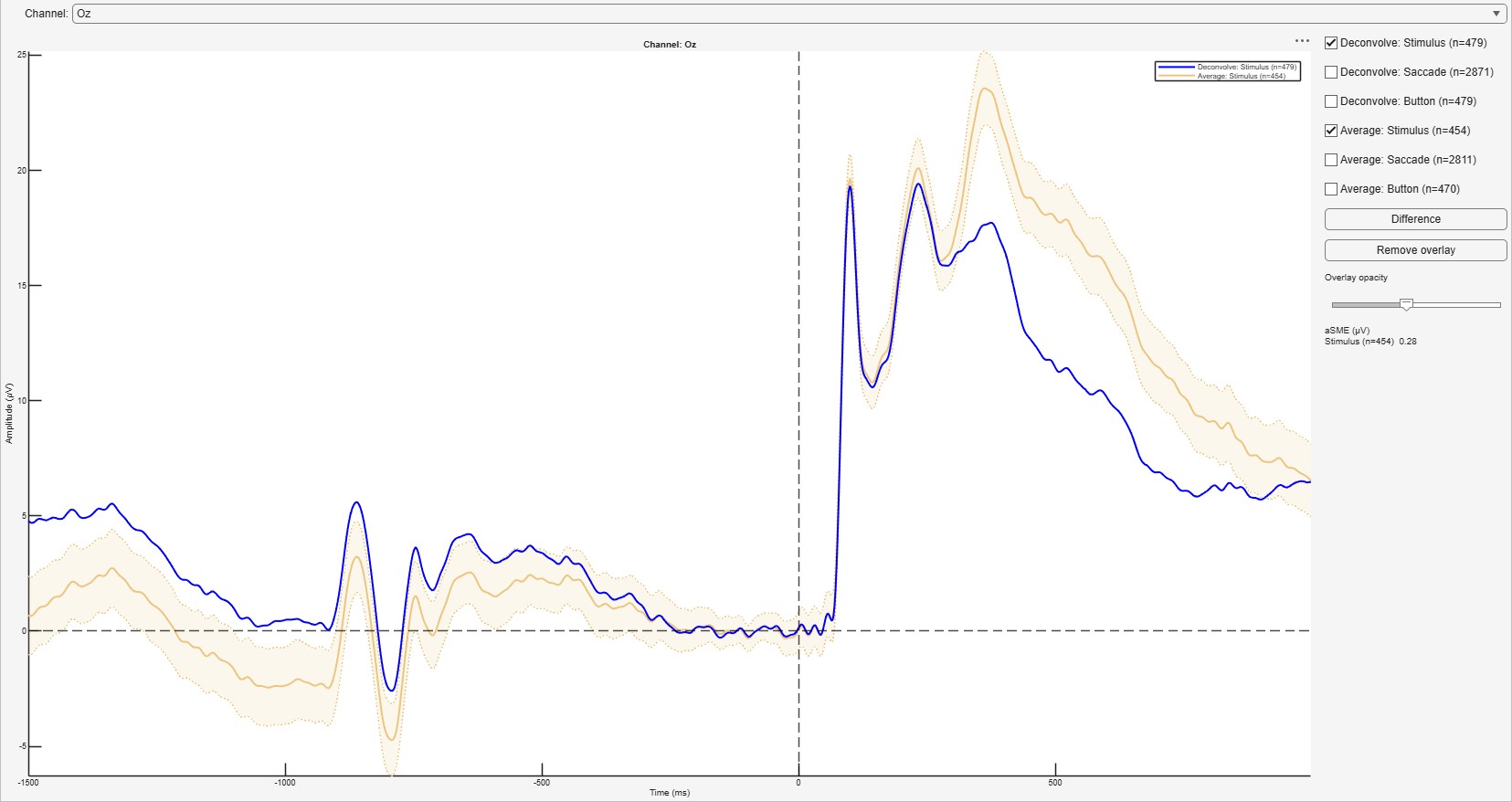
The two agree for the first 300 ms after the face (within 0.7 µV) and then part: between 300 and 500 ms the plain average peaks at 23.6 µV and the deconvolved waveform at 17.7 µV. About a quarter of what looks like a P300 to the faces belongs to the microsaccades and the button press, which is the paper’s point. Ticking the saccade or the button pair instead gives the other two panels of the row. On the same recording, the authors’ own script gives a stimulus waveform at Oz that correlates with this one at r = 0.9998 from -200 to 1000 ms, with a largest difference of 3.2 µV; where the analysis departs from the authors’ is listed at the end of the chapter.
Figure 11, bottom row: the single trials
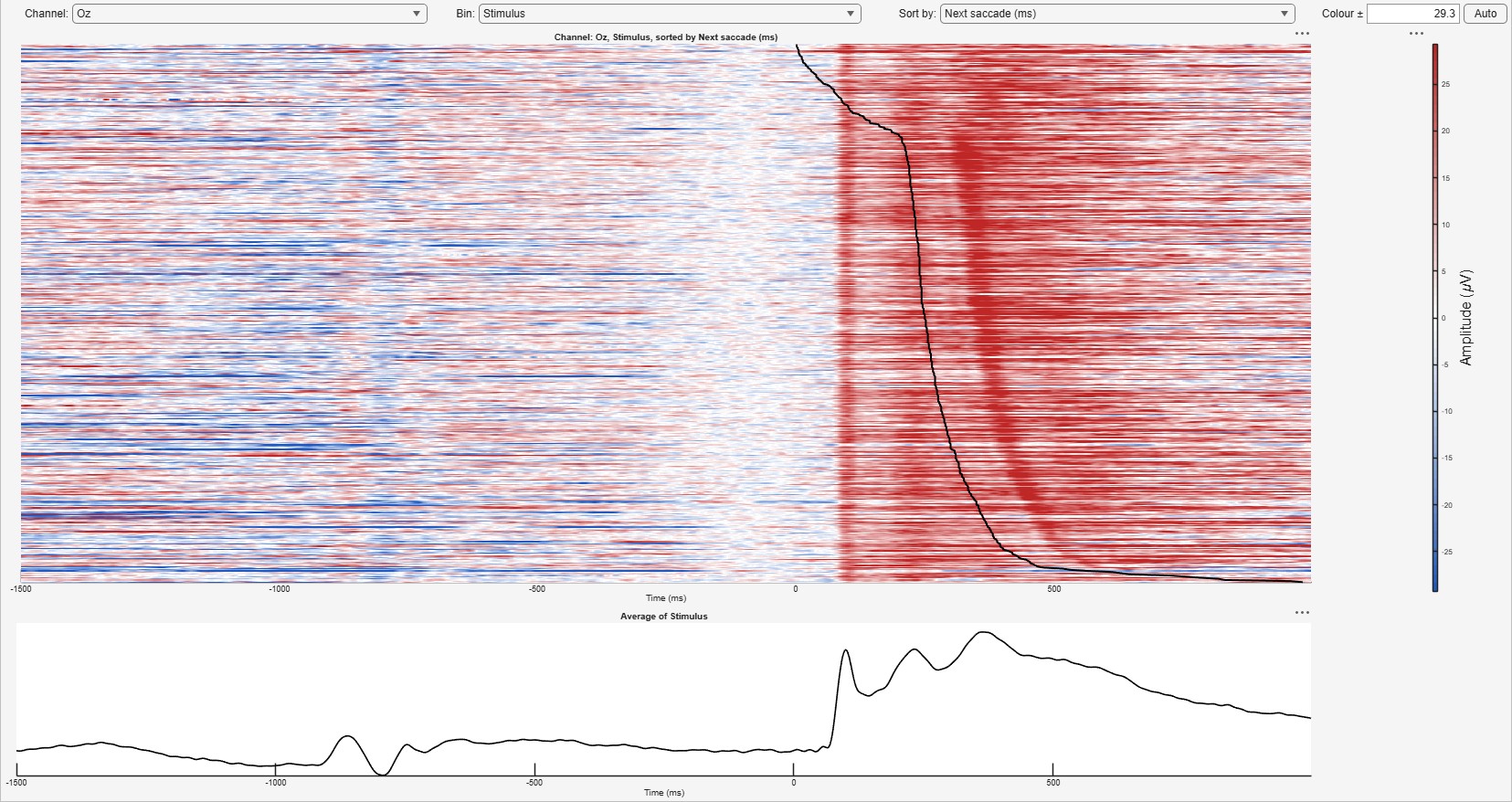
Select the Baseline node (the plain epochs) and, in its ERP image, pick Oz, the Stimulus bin and Sort by: Next saccade. Each row is one trial, ordered by when the first saccade came, and that moment is drawn across the image (The plot area). The response to the face runs straight down at a fixed latency; the lambda response to the saccade follows the line.
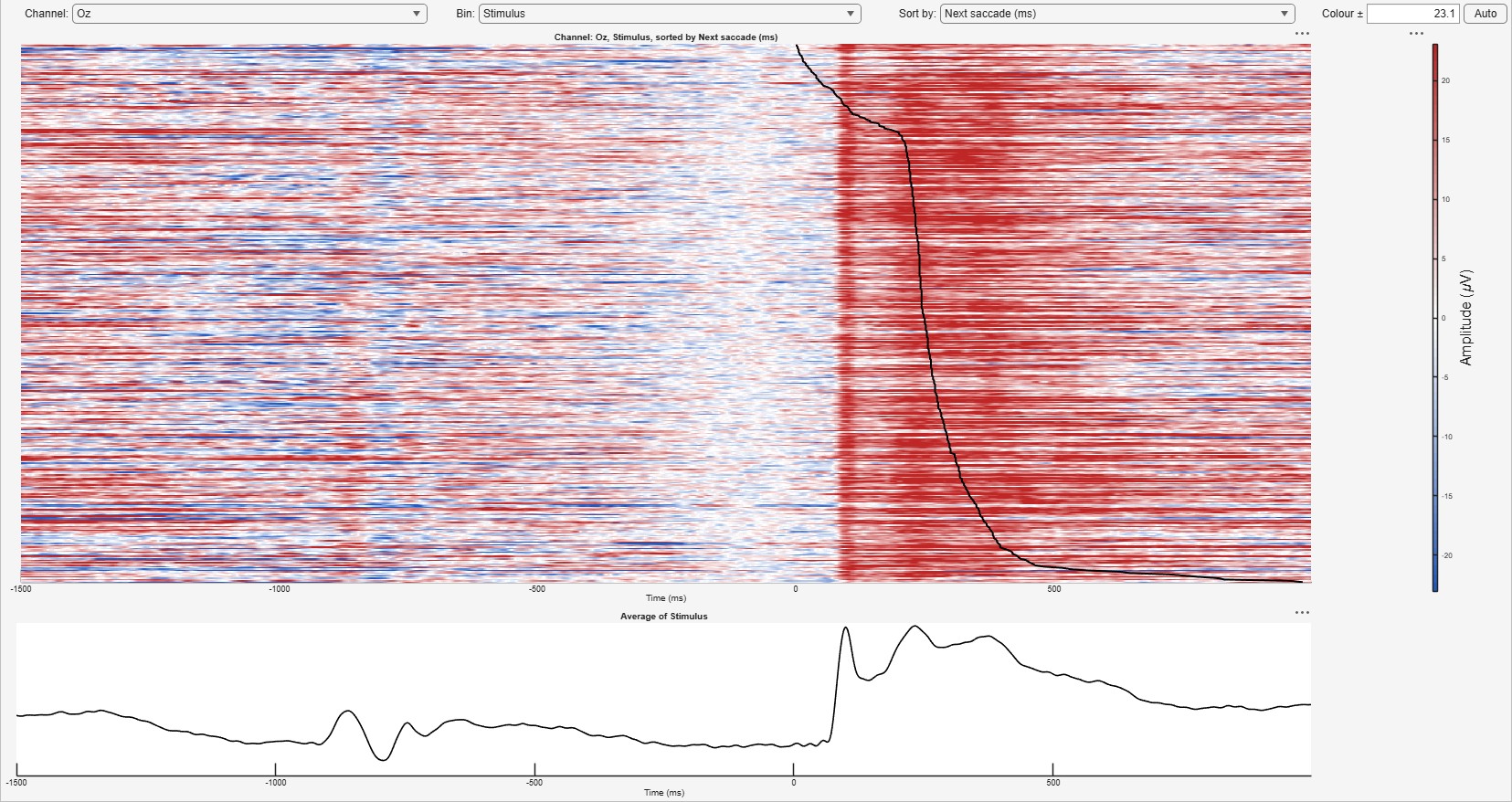
The same settings on the template’s Deconvolve node, the overlap-corrected trials, leave the face’s response alone:
The button press shows it most plainly. In the Button bin, sorted by Previous stimonset, the plain epochs carry the face’s response along the line, further back the longer the participant took to respond; in the corrected trials nothing follows the line:
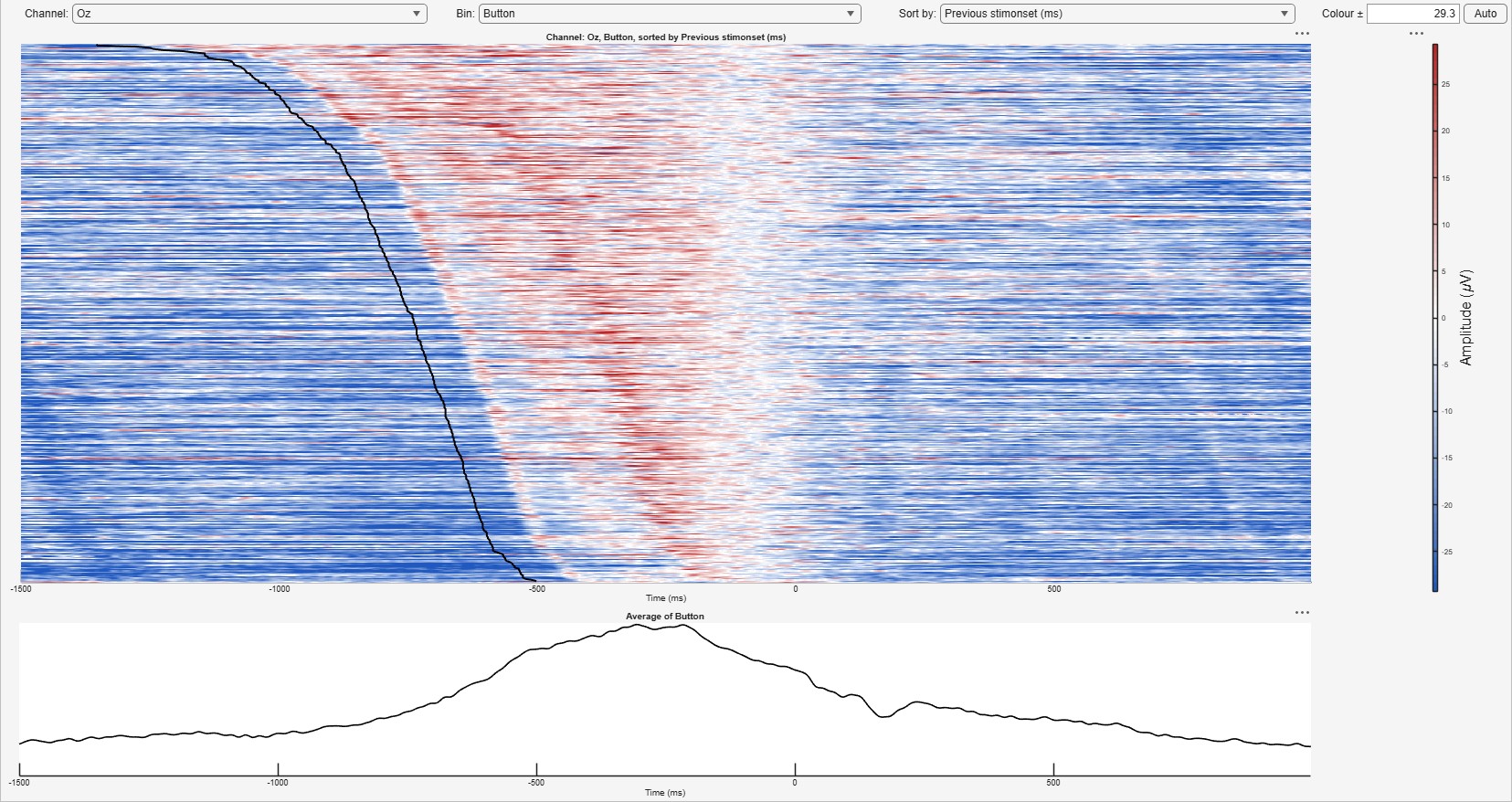
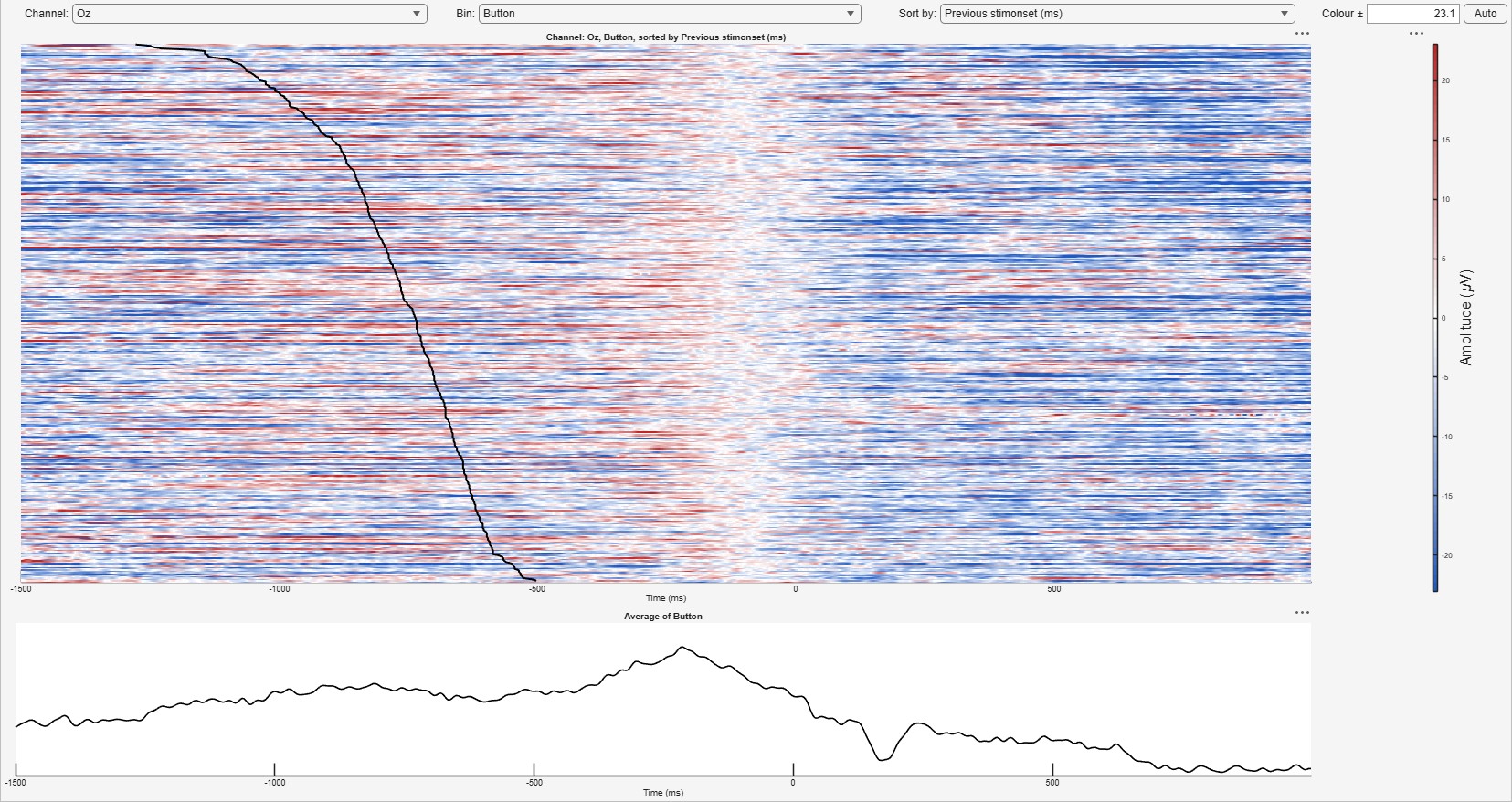
The Saccade bin sorted by Next buttonpress gives the remaining panel (Figure 11D). Each corrected trial is the recording around its event with every other event’s fitted response subtracted, as the Unfold toolbox’s own uf_erpimage makes them (computed by Alakazam, the default; the toolbox’s call gives the same trials, more slowly). 3323 of the 3829 events keep a trial: a window that touches a stretch left out of the model had nothing subtracted there, and is dropped; and a few button presses and faces fall on the very sample of a saccade, where the toolbox keeps one trial for the two, so they have none. The template’s Average of the kept trials comes within 0.3 µV of the fitted waveforms; its stimulus response peaks at 17.9 µV between 300 and 500 ms at Oz, where the fitted waveform peaks at 17.7 µV.
Beyond the figure: how saccade size matters
The third Deconvolve node returns the model’s own view of the saccade term: the saccade response at each amplitude asked for, each a whole waveform with the other terms as their average marginal effects (Unfold’s uf_predictContinuous and uf_addmarginal). With AME the intercept is the response averaged over this participant’s saccades; with the toolbox’s default, MEM, it would be the response to a saccade of the mean amplitude.
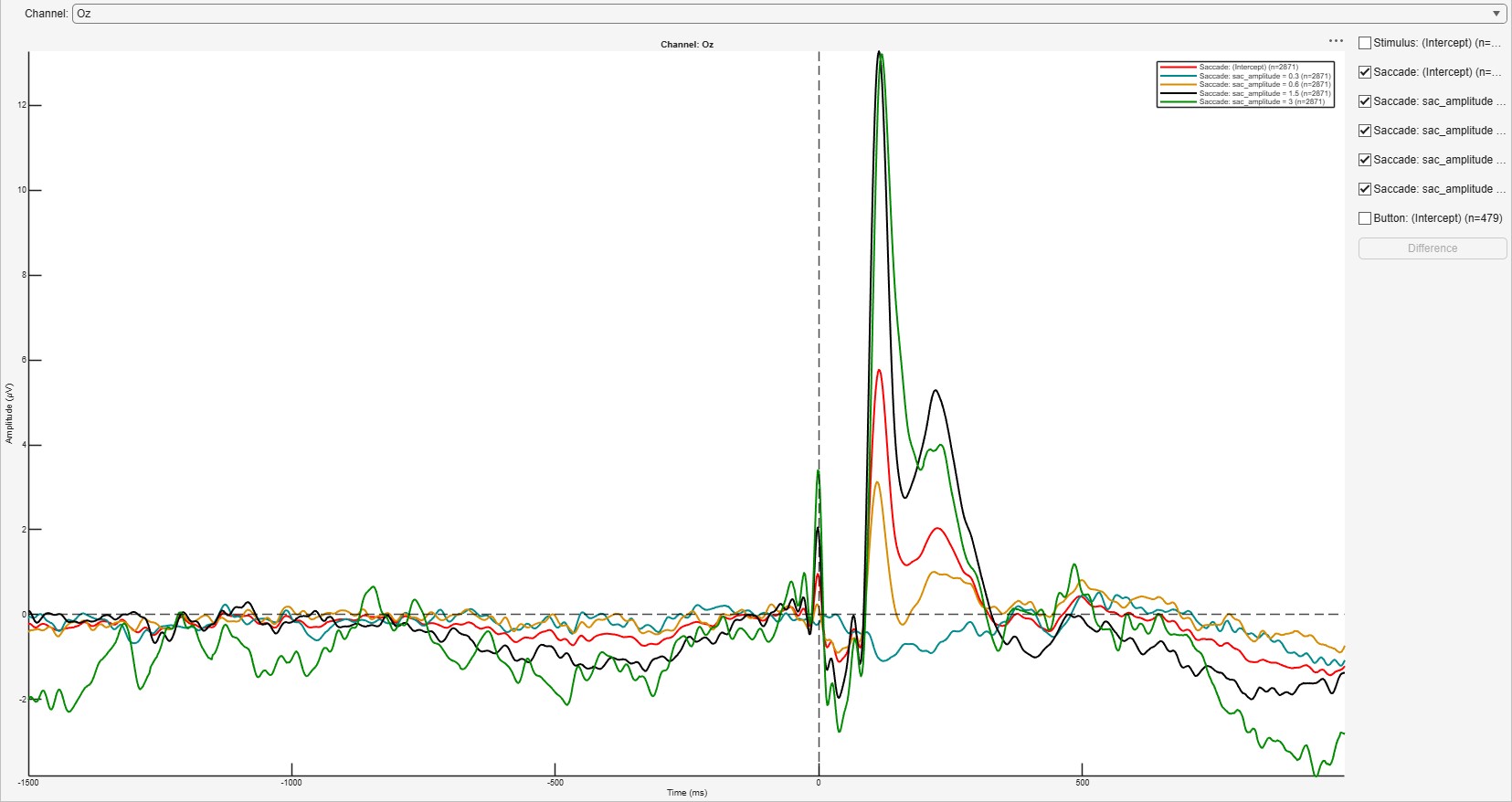
At Oz, the lambda response, 50 to 150 ms after saccade onset, peaks at -0.3, 3.1, 13.3 and 13.2 µV for saccades of 0.3, 0.6, 1.5 and 3 degrees. It grows with amplitude and then levels off: the non-linearity that is the paper’s reason for a spline. The median saccade here is 0.6 degrees, on the steep part of the curve, which is why the saccade’s contribution to the stimulus-locked average depends so much on how large this participant’s microsaccades were.
Where it differs from the paper
- The artefact scan covers the 36 scalp channels, where the authors’ script scans all 40, the eye electrodes included, as the toolbox does by default (Artefact scan on: every channel); an eye channel’s range is several times the EEG’s, so scanning it leaves out far more of the recording.
- One baseline, -200 to 0 ms, serves every bin, where the authors’ script baselines the button-locked panels at 400 to 600 ms.
- The saccade takes five splines, as the paper says; the authors’ script uses ten.
- Panels A and B, the trial timeline and a heat map of saccade end points, are not ERPs and are not reproduced.
Applying it to your own data
- Model every event type whose response overlaps the ones of interest, but only one of any pair locked at a near-constant lag (What to model). A warning that the solver “did not converge” is a sign of a nearly collinear design; such a pair, modelled together, is one cause, and a formula with more terms than its events can support is another.
- Let the formula carry what differs between conditions and is not the effect of interest (reaction time, saccade size): a term is held at the same value for every bin, so it cannot masquerade as a condition effect (Dimigen and Ehinger 2021).
- In free viewing and reading, where eye movements are the task, set the artefact threshold to 0 and model the saccades and blinks instead; the eye-tracking join (Eye tracking) supplies them as events with their amplitudes, durations and positions.